
Support
If you meet with any question about product delivery, product key, program registration, backup or update and more, please read FAQs on this page carefully to figure out whether there are relevant answers you need. If you still have relevant question or problem, please email us.
- What is the difference between trial version and full version?
- Free trial version of Lazesoft Recover My Passsword allows you to detect all Windows installation in your computer, view the user list and specific user attributes. Full version allows the user to actually reset passwords and attributes. You need to order the registration code to register the program to get full version.
- Where can I download Lazesoft software?
- You can download Lazesoft software here. It includes all freeware, shareware’s free trial and beta programs.
- How to get the Full Version of the software?
- You can order our software online. When the purchase is processed, the registration code will be provided immediately and sent to you by email. With the registration code, you can activate the evaluation version and turn to use the full version software.
- What is your refund policy?
- When you purchase Lazesoft products, your satisfaction is guaranteed. Within 30 days, you can request your money back if our products don't do all that we say they will.
- How to uninstall
- Uninstalling
- Here's how to do so:
- Make sure that Lazesoft Product is not running.
- On the Windows Start menu, go to
- Start > Programs > Lazesoft Recovery Prodcut > Uninstall Lazesoft Prodcut
- Click "Yes" to confirm the Uninstall. The Lazesoft Prodcut will be completely removed from your computer automatically.
- Is it secure to buy your software online?
- The online ordering is 100% secure! Our online orders are securely processed by RegNow. They are a service of Digital River (NASDAQ: DRIV), which is a highly-respected registration company to process your order.
- My registration code is invalid. What shall I do?
- Please check the user name carefully whether there is punctuation or other symbols, whether blank spaces are added accidentally and whether the code matches the software type and version.
- Is the upgrade version free of charge?
- Yes, it is free to update the software. The registration name and code you got before is till valid for the new version.
- How to register Lazesoft Recovery Suite
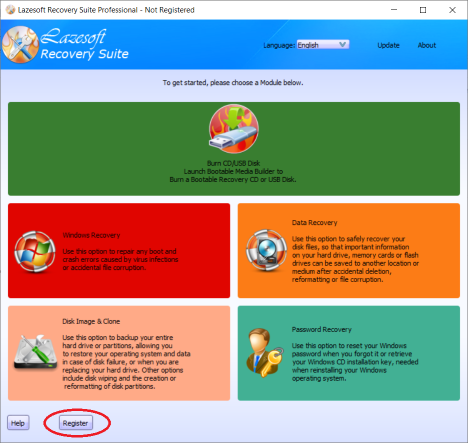
- Launch Lazesoft Recovery Suite
- Click the <Register> button
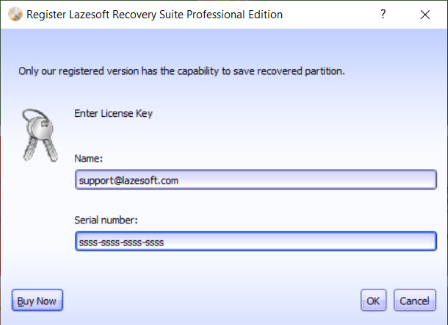
- Then, copy the registration code and name into the register page for registration.
-
- Got an error message saying that the computer is not a 64 bit system.
- Downloaded the application and successfully burned the CD/USB disk. However, it will not boot my target computer, and gives an error message saying that the computer is not a 64 bit system.
- That means your target computer doesnot support 64 WinPE. Please use our software to build an 32 bit WinPE boot disk:
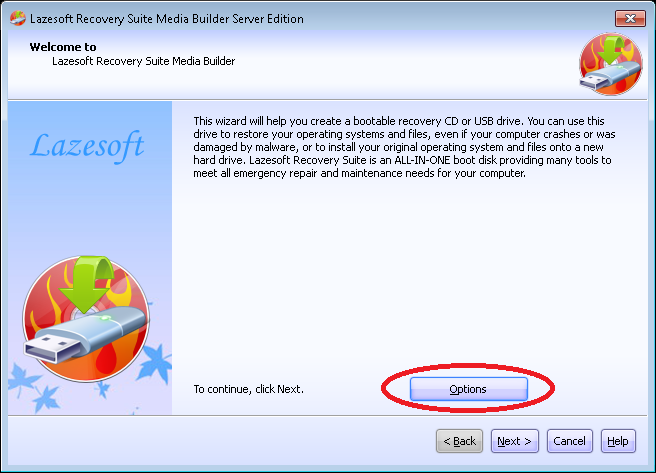
- On the home page of "Media Builder", click the <Options> button, then the "Media builder options" dialog will display.
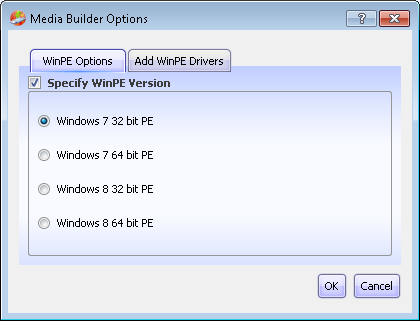
- Check the "Specify the WinPE version" option and select "Windows 8 64 bit PE". Click the <OK> exit the options dialog.
- Following the guides on the Media Builder Wizard to build a bootable disk.
- On the home page of "Media Builder", click the <Options> button, then the "Media builder options" dialog will display.
If you meet with any other questions, please contact us at support@lazesoft.com.
Guides
How to burn a bootable recovery CD?
How to boot from the created recovery CD?
How to create a bootable recovery USB Disk and boot from it?
How to perform a data recovery
How to recover data from formatted or damaged partition
How to fix boot problems if Windows won't start correctly.
How to clone entire disk for backup or upgrading.
How to recover Windows login password?
How to recover Windows Server password?
Forgot Windows admin user password?
Forgot Windows Server 2003 2008 Domain Administrator Password
How to burn a Windows password recovery CD?
How to boot Windows password recovery CD?
How to recover Windows login password?
How to recover administrator password?