
How to unlock a locked Windows user account
You can remove a locked Windows user account locks with the Lazesoft Recover My Password.
The following steps show how to unlock your locked user account.
Download Lazesoft Recover My Password and make a Windows password recovery CD or USB disk.
Then boot from the new burned Lazesoft CD or USB disk, then Lazesoft Recovery My Password will run automatically.
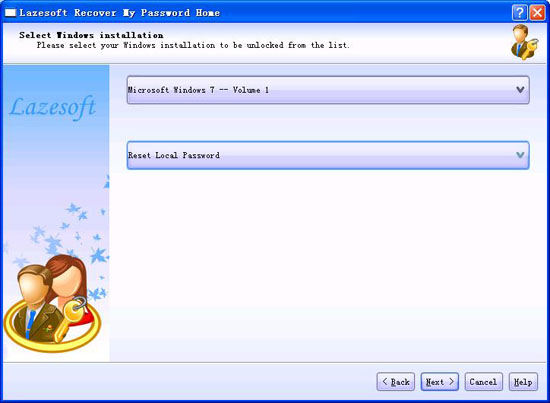
Select your Windows installation volume from the list.
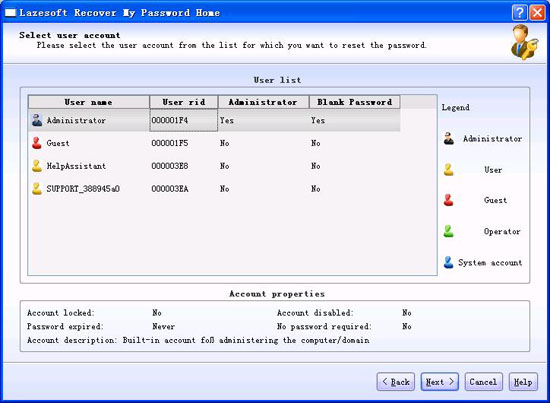
Select a user account for which you want to unlock then click <Next>.
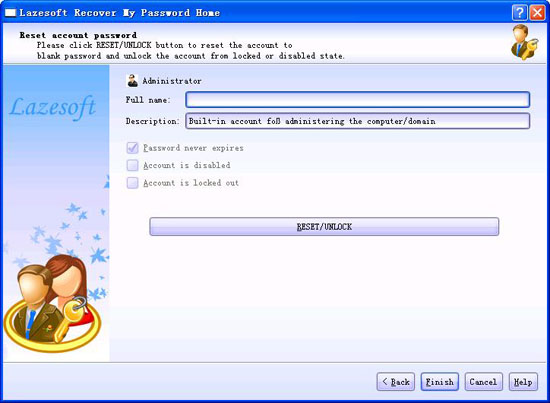
Click the <Reset/Unlock> button to unlock your locked user account.
Lazesoft Recovery Suite is easy to use, powerful boot disk design to Recover Data, Recover crashed Windows System, Recover Windows Password, Clone or Backup Disk, etc.
Guides
How to burn a bootable recovery CD
How to boot from the created recovery CD
How to create a bootable recovery USB Disk and boot from it
How to perform a data recovery
How to recover data from formatted or damaged partition
How to fix boot problems if Windows won't start correctly
How to clone entire disk for backup or upgrading
How to recover Windows login password
How to recover Windows Server password
Forgot Windows admin user password
Forgot Windows Server 2003 2008 Domain Administrator Password
How to burn a Windows password recovery CD
How to boot Windows password recovery CD
How to recover Windows login password
How to recover administrator password
How to recover Windows Server password
How to recover Windows XP password
How to recover Windows Vista password
Testimonials
"If you've ever stared at the login screen and cursed at being locked out of a system this program is a GODSEND. Easy to use and quiet brilliant. A friend's system had been brought to me with this exact problem (evidently their 9 year old had wanted to change the Password and had promptly forgotten what he had chosen)No matter how many attempts the Login screen wouldnt allow them past. This program allowed me to delete their old password (their 9 year old's name spelled backwards btw)and create a new one. System rebooted and entered Vista SP1 at the first try. Thank you. This is a great program." --Argonaught

Awards